
Mouse Double Click Test
Click inside the box like you normally would. If your mouse turns one click into two, the test catches it, measures the gap in milliseconds and tells you which button is failing.
Works with left, right, middle and side buttons and the scroll wheel. Runs in your browser, nothing to install.
Click test area
Click here, one slow click at a time
Click inside the box to start the test.
| Button | Clicks | Double clicks | Fastest gap |
|---|---|---|---|
| Left | 0 | 0 | – |
| Middle | 0 | 0 | – |
| Right | 0 | 0 | – |
| Back | 0 | 0 | – |
| Forward | 0 | 0 | – |
Scroll wheel: 0 up · 0 down
Two presses of the same button closer than this are counted as an accidental double click. 80 ms suits most people.
Last clicks
Your clicks will show up here with the time since the previous one.
How to test your mouse for double clicking
Click slowly inside the box
Use the left button first. Give 20 to 30 single clicks, about one per second, the way you click on a file or a link. Don’t try to click fast. You want to see what the mouse does with one normal press.
Watch for a red flash
Each click shows up in the list with the time since the one before. A normal single click is hundreds of milliseconds after the last one. If a click appears just 5 to 50 ms after the previous one, the box flashes red and it’s counted as a double click.
Hold and release
Press the left button, hold it for a second, and let go. Do it ten times. A worn switch often bounces when you release it, which is why drag-and-drop suddenly drops files. The test catches that bounce too.
Test the other buttons
Repeat with right click, the wheel button and the side buttons. Scroll the wheel up and down slowly: if the counter jumps the wrong way, the wheel encoder is dirty or worn.
How the double click test works
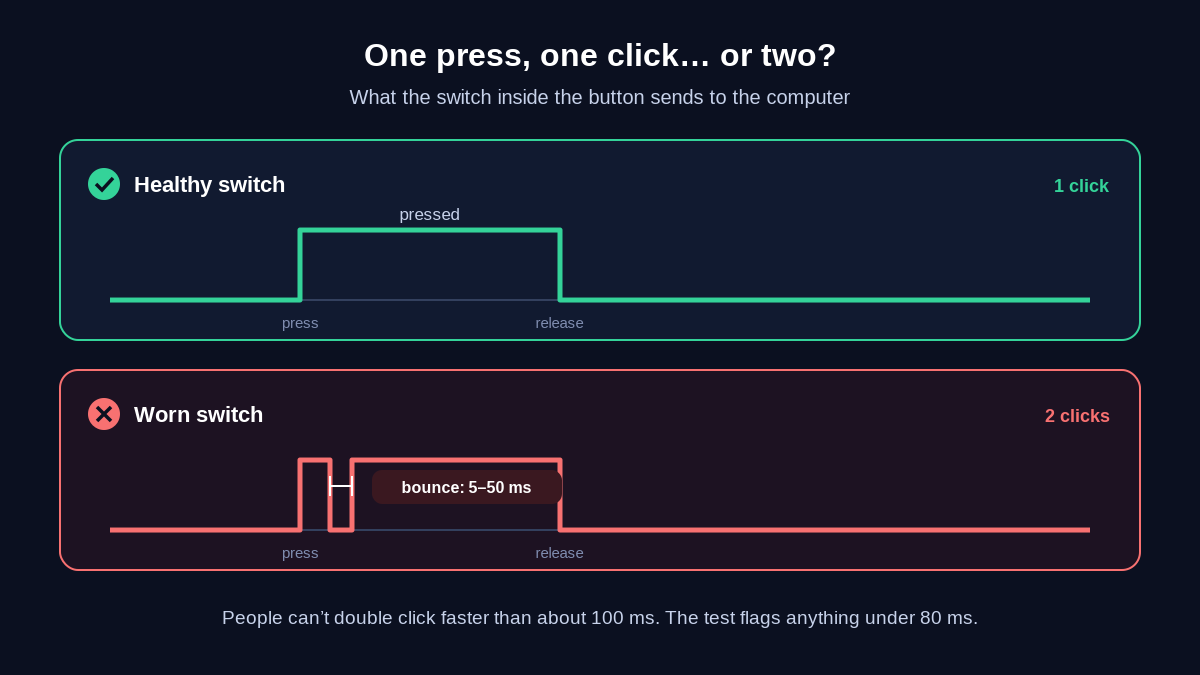
Inside every mouse button is a tiny metal spring switch. When it’s new, one press closes the contact once. Over time the metal tires or the contact surface gets dirty, and on a single press the contact bounces: it closes, opens for a moment, and closes again. The computer sees two clicks.
The tool records the exact time of every press using your browser’s high-resolution timer. When two presses of the same button arrive closer together than the threshold (80 ms by default), it marks the second one as an accidental double click. It also flags a press that comes less than 25 ms after a release, which is how a bouncing switch breaks a drag.
On purpose, even fast double clickers rarely get below about 100 ms between clicks. So if you clicked once and see a gap of 8 or 20 ms, that wasn’t you.
What your double click test results mean
No double clicks after 30 clicks
The switch is fine. If you still get double clicks in Windows, check the double-click speed and the ClickLock setting, and update the mouse software. Our mouse double clicking fix guide covers those settings.
A few double clicks, gaps of 5–50 ms
Classic worn or dirty switch. It usually gets worse over weeks. Try the cleaning steps below. If you’re still under warranty, this is a known fault, so claim it.
Double clicks only when you hold and release
The switch bounces on release. You’ll notice it as dropped drags and text selections that stop halfway. Same fix as above.
Gaps between 60 and 100 ms
Borderline. You may just be clicking fast. Click slower and test again. If they keep showing up on slow clicks, treat it as a failing switch.
Mouse failed the test? What to do next
Try it on another computer
If it double clicks there too, it’s the mouse. If it’s clean on the other computer, look at drivers, mouse software and settings on yours.
Blow out the switch
Unplug the mouse, press and hold the faulty button, and give it short blasts of compressed air around the edge of the button. Click it fast 50 to 100 times. Dust is a common cause and this sometimes fixes it for months.
Check warranty first
Many mice come with two years or more of warranty, and double clicking is a known fault on several models. Contact the maker before opening anything up.
Replace the switch or the mouse
If you’re comfortable with a soldering iron, the switch is a cheap part. Otherwise a new mouse is the reliable fix. For step-by-step settings and cleaning, read our guide to fixing a mouse that double clicks.
Setting up the rest of your desk? Check your mic with the online microphone test, your audio with the speaker and headphone test, and your camera with the webcam test.
Mouse double click test questions
How do I test if my mouse is double clicking?
Click slowly and normally inside the test box above, one click at a time, 20 to 30 times. If the tool flags a double click when you only pressed once, the mouse sent two clicks for one press. Try it with the left button first, since that is the one that wears out most.
What threshold should I use?
Leave it at 80 ms. A person double clicking on purpose almost never gets two clicks closer than about 100 ms, while a failing switch usually sends its second click 5 to 50 ms after the first. If you are a very fast clicker and get flagged on purpose double clicks, lower it to 50 or 60 ms.
Can this test tell if it is the mouse or Windows?
Partly. The test sees the clicks exactly as the browser receives them. If it flags double clicks here, the extra click is coming from the mouse or its driver, not from a Windows setting like double-click speed. To be sure it is the hardware, run the test with the same mouse on another computer.
Why does a single click sometimes drop what I am dragging?
That is the same fault in reverse. While you hold the button, the worn switch briefly lets go and presses again. The test catches this too: hold the left button for a second, then release. If it shows a press a few milliseconds after a release you did not make, the switch is bouncing.
Does this work for the right, middle and side buttons?
Yes. Right click, the scroll wheel button and the back and forward side buttons are all counted separately, and the page blocks the context menu and back navigation while your pointer is inside the box. The scroll wheel is counted up and down too, so you can check for a wheel that jumps.
Does it work on a laptop touchpad or a phone?
A touchpad tap counts as a left click, so you can test it, but touchpad problems are usually settings rather than worn switches. On phones and tablets, a tap is reported as a click with a delay, so the timing is not precise enough to judge hardware. Use a computer with the mouse plugged in.
Is anything recorded or sent anywhere?
No. The clicks are counted in your browser and are cleared when you press Reset or leave the page. The test does not use the camera or microphone.
Still unsure? Contact us with your mouse model and what the test showed.