
Bass Test: Subwoofer Frequency Sweep (20-200 Hz)
Play single bass tones or a slow sweep from 20 to 200 Hz. Find the lowest note your subwoofer, speakers or headphones can really play, and catch rattles before a movie does.
Runs in your browser. No download, no sign-up and no microphone.
Bass and subwoofer test
Turn your volume down first. Low tones can sound quiet but move a lot of air. Loud sub-bass can damage small speakers and is tiring on your ears. Start low and raise it slowly.
Pick a tone below or run a sweep.
Ready. Turn your volume down, then pick a tone or start the sweep.
Single tones keep playing until you press Stop. The sweep takes 30 seconds. Sound goes to your device’s current output.
How to run a bass test on your subwoofer
Turn the volume down
Set your system volume to about a quarter and leave the signal level here at 10%. A pure sine tone at 30 Hz can push a woofer much harder than music at the same volume, and you won’t always hear it coming.
Start at 50 Hz
Press 50 Hz. Almost any subwoofer plays this, so if you hear a steady hum the sub is powered, connected and getting signal. Silence here means a setup problem, not a frequency limit. Skip to the setup checks.
Run the sweep up
Press Sweep up 20 → 200 Hz and listen from your normal seat. The moment a clear note appears, press I can hear it. That number is roughly how low your system goes in your room.
Listen for rattles and dips
Play the sweep again and pay attention to anything that buzzes, or spots where the bass suddenly gets much quieter or louder. Those are usually room effects. Click single tones near that frequency to pin it down.
Check the crossover
Play 60, 80, 100 and 120 Hz. The bass should sound about even across them. A big jump or hole between the sub and your main speakers means the crossover or phase setting needs a tweak.
Bass frequency chart: what each range should sound like
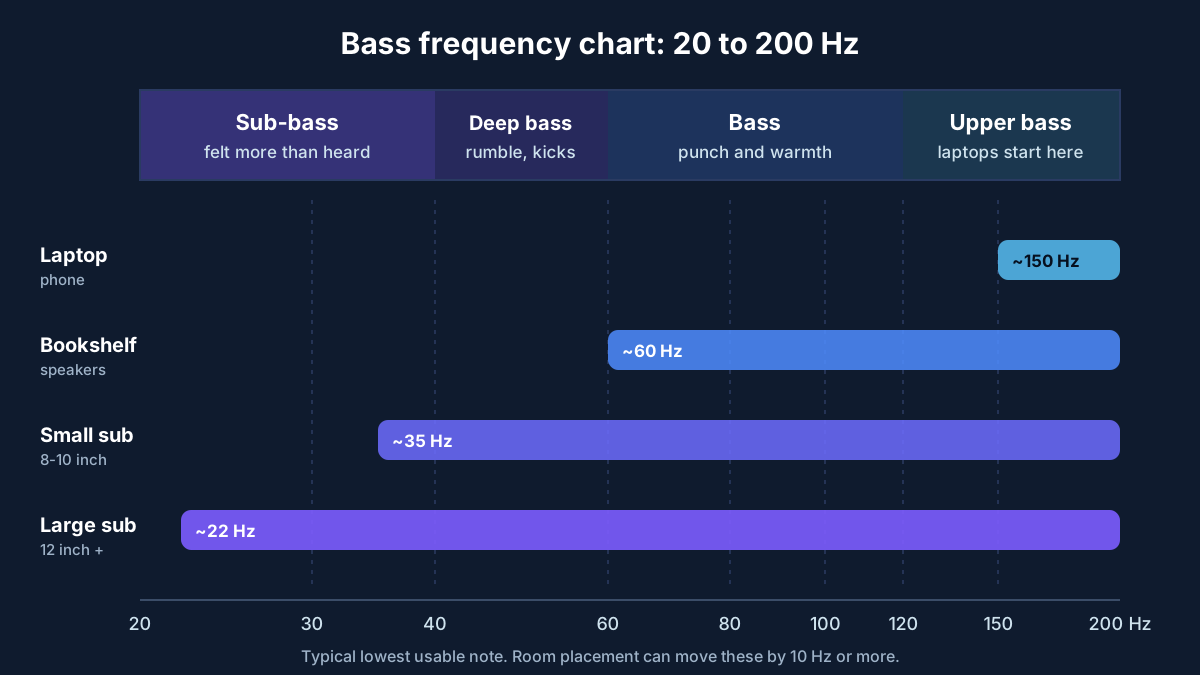
20-40 Hz: sub-bass
Felt more than heard. Explosions, organ pedals, deep synth notes. Only real subwoofers get here, and even then the bottom 5-10 Hz often fades out.
40-60 Hz: deep bass
Kick drums, bass guitar low notes and most movie rumble. This is the range people mean when they say a sub “hits”.
60-120 Hz: bass
Warmth and punch. Bookshelf speakers usually start somewhere in here, and the usual crossover to a subwoofer is 80 Hz.
120-200 Hz: upper bass
Where laptop and phone speakers begin. If you only hear the sweep after 150 Hz, the bass you hear in music on that device is mostly an illusion your brain fills in.
No bass, weak bass or boomy bass? Check these
Sub is silent
Power switch and auto-standby first. Then the LFE cable, the sub’s own volume knob, and the receiver’s speaker setup: subwoofer set to Yes. On a 5.1 PC setup, run the surround sound test and check the subwoofer channel on its own.
Bass is thin
Set the main speakers to Small in the receiver so bass gets sent to the sub. Try the crossover at 80 Hz. On Windows, turn off “Bass Boost” or other enhancements and test again so you hear what the hardware really does.
One note booms
Room modes. Your room boosts some frequencies and cancels others. Moving the sub even half a meter, or out of a corner, changes it more than any setting will.
Gap around 80-100 Hz
Flip the sub’s phase switch (0° / 180°) and play 80 Hz from your seat. Keep whichever setting sounds louder. Then nudge the crossover up or down.
What this bass test can’t tell you
The tool plays clean sine waves from 20 to 200 Hz in your browser. It helps you hear where your bass starts, where it fades and where the room gets in the way. It isn’t a measurement. Your ears are less sensitive to low notes, so 30 Hz needs much more energy than 100 Hz to sound equally loud, and the browser can’t tell what reached your seat. For a real frequency response graph you need a measurement microphone and room software.
Checking the rest of your system? The speaker and headphone test checks left and right, and the surround sound test plays each 5.1 or 7.1 channel. If there’s no sound at all, see headphones not working on PC.
Bass and subwoofer test questions
What is a good bass test frequency for a subwoofer?
Start at 40-60 Hz. Almost every subwoofer plays that range cleanly, so it tells you the sub is on and wired. Then go lower with 30 and 25 Hz to see where yours gives up, and try 80-120 Hz to check how it blends with your main speakers around the crossover.
Why can’t I hear 20 Hz?
That’s normal. 20 Hz sits at the bottom edge of human hearing, and most home subwoofers drop off somewhere between 25 and 35 Hz. Laptop and phone speakers usually can’t go below 100-150 Hz at all. If you feel pressure or see the cone move without hearing a note, that counts as working.
My subwoofer is silent during the test. What should I check?
Check it has power and its own volume knob is up, then the cable from the receiver’s SUB or LFE out. In the receiver, the subwoofer must be set to Yes and your main speakers set to Small, or the bass stays in them. On a PC, a 2.1 system usually handles this itself; a 5.1 system may need the subwoofer channel test in the surround test.
Something buzzes or rattles at certain frequencies. Is that my speaker?
Often it’s the room, not the speaker. Windows, picture frames, shelves and loose panels all vibrate at their own frequency. Play the tone that causes it, walk around and touch things until it stops. If the buzz comes from the speaker itself even at low volume, the cone or surround may be damaged.
Can a bass test damage my speakers?
At sensible volume, no. Damage comes from playing very low tones loudly through speakers that can’t reproduce them, because the cone moves further than it’s built for. That’s why this tool caps the signal at 30% and starts at 10%. If you hear distortion, a flapping sound or a hard knock, turn it down right away.
Does this work with headphones?
Yes, and it’s a good way to see how deep a pair goes. Keep the volume low, since sine tones feel quieter than they are and low notes can mislead you about how loud the overall level is.
Still stuck? Contact us with your speakers or subwoofer model and the frequency where the bass dropped out.